Mailchimp Email Templates: Design Memorable Newsletters
In the world of digital marketing, your email is often the first and most direct line of communication with your audience. But with inboxes more crowded than ever, simply hitting send isn't enough. You need to make an impact, and that starts with design. A well-crafted email does more than just deliver a message; it builds your brand, tells a story, and engages readers on a visual level. This is where the power of professional Mailchimp email templates comes into play, transforming your marketing from a simple broadcast into a memorable experience.
Think about the emails you actually enjoy opening. They are rarely plain text walls. They use color, imagery, and a clear layout to guide your eye. A great newsletter template achieves this effortlessly. It provides a structured canvas for your content, ensuring that your announcements, promotions, and updates look polished and professional. For anyone serious about their online presence, from a solo blogger to a growing e-commerce store, using a pre-designed template is a strategic move that saves time and elevates quality.
Why Your Email Marketing Strategy Needs a Visual Upgrade
Your marketing strategy is built on connection and trust. A generic or poorly formatted email can unintentionally signal a lack of professionalism. On the other hand, a clean, colorful, and well-organized design immediately communicates credibility. It shows you value your audience's experience enough to present information in an accessible and aesthetically pleasing way. This visual appeal is not just about looking good; it's about improving readability and driving action. A clear call-to-action button, strategically placed within a beautiful layout, is far more effective than a hyperlink buried in a paragraph.
Furthermore, consistent design across your communications strengthens brand recognition. When your audience sees your signature color palette and layout style, they instantly know it's from you. This consistency, achieved through reusable Mailchimp email templates, turns every email into a brand-building touchpoint. It’s a practical way to ensure your newsletters, promotions, and transactional emails all contribute to a cohesive brand identity, helping you stand out in a competitive digital landscape.
Practical Applications Across Industries
The versatility of a high-quality template is one of its greatest strengths. It's not a one-size-fits-all solution, but a adaptable framework. Consider how different professionals can leverage a multipurpose design:
- For E-commerce and Retail: Showcase new products with stunning images, announce seasonal sales with vibrant colors, and guide customers directly to your shop with clear "Shop Now" buttons. The structured layout helps organize multiple product features without looking cluttered.
- For Bloggers and Magazines: Drive traffic to your latest articles with engaging headlines and featured images. Use the template to create a weekly digest or a special announcement that feels like a premium publication, encouraging higher open rates and click-throughs.
- For Corporate and Agencies: Share company news, case studies, or event invitations with a sleek, professional look. The clean design maintains a serious tone while still being engaging, perfect for B2B communication or client updates.
- For Creatives like Photographers and Designers: Your email becomes a mini-portfolio. Use the layout to display your work beautifully, letting the visuals speak for themselves. A well-designed template ensures your art is presented with the respect it deserves.
No matter your field, the goal is the same: to communicate effectively and make your online business memorable. A thoughtfully designed template removes the technical barriers, allowing you to focus on crafting a message that resonates.
Key Features That Make a Difference
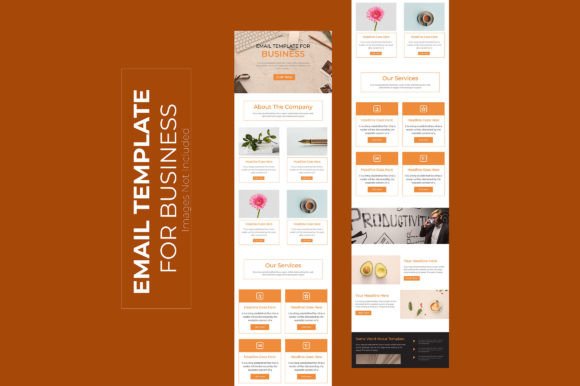
When selecting a template, the details matter. A template built on a 600px width is the industry standard for email clients, ensuring your design displays correctly everywhere. But beyond compatibility, look for features that offer real-world convenience and creative control. A template provided in Adobe Illustrator format, for instance, offers immense flexibility. You can easily edit colors, fonts, and imagery to match your exact brand guidelines, giving you a truly custom look without the custom price tag.
An organized file with well-named layers is a lifesaver for efficiency. It means you can find and modify elements quickly, rather than wasting time deciphering a messy design file. Similarly, the use of free Google Fonts is a huge advantage. It ensures your typography is modern and readable, and you won't face any licensing issues. These practical considerations—easy editability, professional layout, and included resources—are what separate a frustrating design project from a smooth and successful one. They empower you to create something beautiful, even if you're not a seasoned designer.
Getting Started and Making It Your Own
Embracing a new Mailchimp email template is straightforward. The first step is to choose a design that aligns with your brand's personality. Is your brand energetic and playful? Look for a template with bold colors and dynamic shapes. Is it more minimalist and professional? A template with ample white space and a muted palette would be a better fit.
Once you have the template, the real fun begins. Customize it. Swap out the placeholder images with your own high-quality photos. Adjust the color scheme to your brand's hex codes. Update the copy with your unique voice and message. The goal is not to use the template as-is, but to use it as a powerful starting point. Treat it like a recipe—you follow the structure but add your own ingredients to create something that is uniquely yours.
Remember, the ultimate purpose is to serve your audience. A great template helps you do that by making your content more digestible and enjoyable to consume. It supports your marketing goals by making every email you send a polished extension of your brand. By investing in a clean, professional, and completely editable design, you are investing in the perception of your business and the effectiveness of your communication. It’s a simple step that can have a profound impact on how the world sees your online venture.