Mastering Your Visuals: A Practical Guide to Banner Design Templates and Podium Mockups
In the competitive digital landscape, your first impression is often your only chance to capture a potential customer's attention. High-quality visuals are no longer a luxury; they are the bedrock of credible advertising and branding. While custom design from scratch is ideal, it is often prohibitively expensive and time-consuming. This is where Banner Design Templates step in, offering a bridge between professional aesthetics and practical execution. However, the true power of these assets is unlocked when combined with sophisticated display methods, such as the Podium product mockup. This integration transforms a flat graphic into a tangible, professional presentation, allowing entrepreneurs, marketers, and creators to showcase their products with the elegance of a physical launch event.
The Allure of the Podium: Beyond Flat Graphics
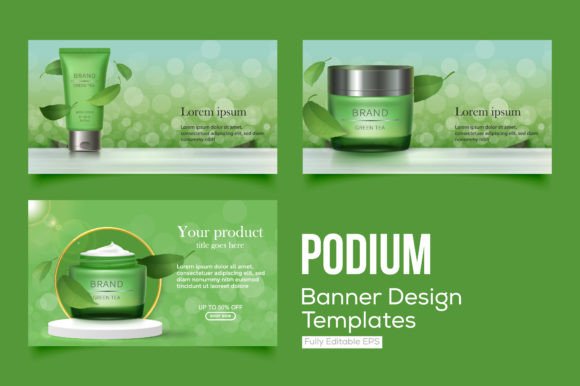
Imagine walking into a trade show or a high-stakes presentation. You don't just see a product taped to a wall; you see it elevated on a sleek podium, spotlit and framed to draw the eye. A Podium product mockup banner design replicates this psychological trigger digitally. It combines the informational utility of a banner—conveying dates, offers, or brand messaging—with the prestige of a podium display. This approach is particularly effective for product launches, webinar promotions, and social media carousels where you need to demonstrate that your offering is substantial and worth attention.
For the freelancer or small business owner, this technique solves a common problem: how to make a digital good look "real." By placing your design onto a 3D-rendered podium or a banner stand, you provide context. You aren't just selling an image; you are selling an experience. This versatility makes these templates invaluable for e-commerce stores, educators promoting courses, and bloggers seeking to professionalize their affiliate marketing efforts.
Avoiding the Pitfalls: Where Beginners Go Wrong
Despite the accessibility of Banner Design Templates, many users struggle to achieve the polished look they see in the preview files. The issue usually isn't the tool, but rather the application. Understanding these common missteps is the first step toward creating visuals that actually convert.
The "Clutter Trap" and Loss of Focus
One of the most frequent errors is treating the banner as a dumping ground for information. A podium mockup is designed to highlight a focal point. When you crowd the design with excessive text, multiple logos, and competing calls to action, you defeat the purpose of the elevated display.
- The Mistake: Adding five bullet points, a large QR code, and a lengthy tagline onto a single banner stand.
- The Consequence: The design becomes illegible, especially on mobile devices. The "podium" effect is lost because the eye has nowhere to rest, making the brand look desperate or disorganized.
- The Better Approach: Embrace minimalism. Let the podium mockup do the heavy lifting for the "wow" factor. Your text should be limited to the essential value proposition. Use the surrounding negative space to frame your message.
Ignoring Resolution and Aspect Ratios
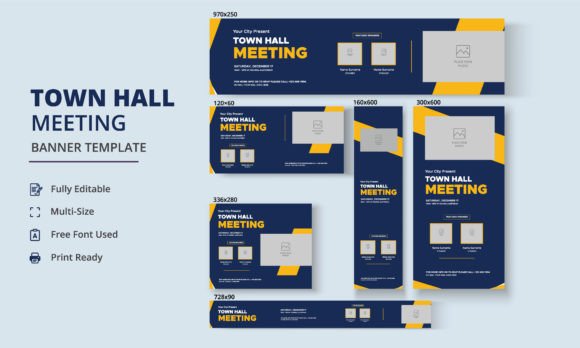
A beautiful template can be ruined instantly by a pixelated logo or a stretched product image. Beginners often download a template designed for a specific platform—like a Facebook cover or a LinkedIn banner—and try to force-fit it into a different format, such as an Instagram story or a physical print flyer.
- The Mistake: Taking a horizontal leaderboard banner template and trying to use it for a vertical digital signage display without adjusting the composition.
- The Consequence: Distorted graphics and unprofessional cropping. This signals to the audience that the brand lacks attention to detail, which can erode trust before they even read your offer.
- The Better Approach: Before you start editing, check the dimensions. If you need a versatile solution, look for banner design templates that come in a bundle with multiple aspect ratios. Always export your final product at the highest resolution supported by the platform.
Overlooking Brand Consistency
Templates are starting points, not finish lines. A common oversight is using a template’s default color scheme or font pairing because it looks "cool" in isolation, even if it clashes with the rest of the brand identity.
- The Mistake: Using a neon green and black cyberpunk podium mockup for a financial consulting firm that uses navy blue and serif fonts.
- The Consequence: Cognitive dissonance for the viewer. They see a disconnect between your marketing materials and your actual service, which makes you appear less reliable.
- The Better Approach: Customize the template to match your Brand Style Guide. Change the background textures, adjust the lighting on the podium to match your brand colors, and ensure your typography is consistent across all assets.
Practical Advice for Evaluating and Using Templates
When you decide to integrate podium mockups into your workflow, you need a strategy for selection and execution. Not all templates are created equal, and knowing what to look for can save you hours of frustration.
Check the Smart Object Layers
If you are using Photoshop-based templates, the ease of use depends entirely on the "Smart Objects." A poorly constructed template forces you to manually warp your image to fit the perspective of the podium. A high-quality template will have clearly labeled layers where you simply paste your flat design, and the software automatically bends and shadows it to look realistic.
Assess the Lighting and Shadows
Realism is the goal. When evaluating a Podium product mockup, look closely at the shadows. Do they look natural? Is the light source consistent? If you place a bright white banner into a mockup that has a warm, dimly lit atmosphere, it will look pasted on. Better templates allow you to adjust the shadow opacity and color to match your specific design elements.
Consider the "Context of Use"
Think about where this banner will live. A podium mockup works wonders on a landing page hero image or a LinkedIn announcement. It conveys authority. However, it might look out of place in a casual, ephemeral Instagram story where raw, unpolished content often performs better. Use these professional templates for your "evergreen" assets—headers, ads, and presentations—where you want to project stability and expertise.
Conclusion: Elevating Your Message
The goal of using Banner Design Templates combined with podium presentations is not just to decorate a page; it is to communicate value instantly. By avoiding the trap of clutter, respecting technical specifications, and maintaining brand consistency, you can turn simple templates into powerful marketing assets. Whether you are a freelancer pitching a new client or a small business owner launching a product, these designs offer a way to present your work with the confidence and polish of a major corporation. Take the time to customize, refine, and contextualize your designs, and your audience will respond to the professionalism you project.