Travelo: A Versatile Template for Professional Presentations
Creating a presentation that is both visually engaging and structurally sound can be a significant challenge. Whether you are pitching a new client, showcasing a portfolio, or outlining a corporate strategy, the design of your slides directly impacts how your message is received. A poorly designed deck can distract from your content, while a polished one enhances credibility and holds attention. This is where a high-quality template like Travelo offers a practical solution, providing a professional foundation for a wide variety of presentation needs.
More Than Just a Travel Theme
While the name "Travelo" suggests a focus on the travel and tourism industry, its design is intentionally versatile. The template's clean lines, balanced layouts, and modern aesthetic make it suitable for numerous contexts. A creative agency could use it to present a new branding campaign. A photographer might use it to display a portfolio of work. A small business owner could adapt it for a product launch, and an educator might find it useful for delivering a workshop. The core value lies in its ability to adapt to your content, not the other way around.
Streamlining Your Workflow with Smart Features
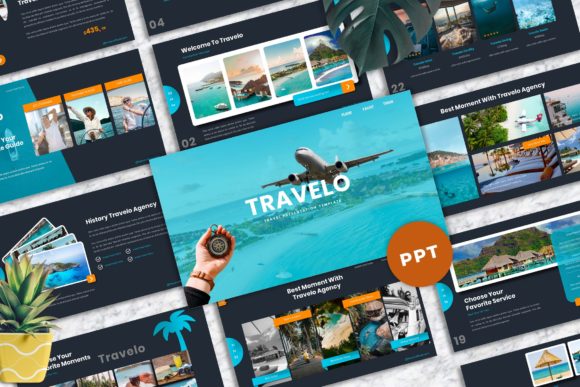
One of the most time-consuming aspects of building a presentation is arranging elements and ensuring visual consistency. Travelo addresses this by offering 40 master slide layouts. These are not just 40 different starting points; they are professionally designed frameworks that guarantee alignment, spacing, and typography remain consistent across your entire deck. This master slide system is the backbone of the template, ensuring that every slide you create looks like part of a cohesive whole.
Further simplifying the process is the inclusion of picture placeholders. Instead of manually inserting and cropping images into oddly shaped frames, you can simply drag and drop your own photos directly into the designated areas. The template automatically handles the formatting, saving you from tedious adjustments. This feature alone can cut your slide preparation time in half, allowing you to focus on refining your message rather than wrestling with image placement.
Design That Communicates Effectively
Effective presentations rely on more than just images; they require clear communication of information. Travelo places a strong focus on typography and usability. It utilizes recommended free web fonts, ensuring your text is not only stylish but also highly readable on any screen, from a laptop to a projected display. The careful attention to typographic hierarchy—using size, weight, and spacing to guide the viewer's eye—helps your audience follow your narrative effortlessly.
The template also includes a library of vector-based icons. These scalable graphics are perfect for illustrating concepts, breaking up dense text, or adding visual interest to data slides. Because they are vector-based, they remain crisp and clear at any size, unlike pixelated images that can look unprofessional when scaled. This collection provides a quick way to add meaningful visual cues that support your talking points.
Practical Considerations for Real-World Use
A presentation template should be a tool, not a constraint. Travelo is built on a 16:9 widescreen ratio, the modern standard for presentations, ensuring compatibility with most projectors and monitors. The easy color change feature allows you to quickly adapt the entire color palette to match your brand or the mood of your presentation. This is done through the master slides, so a single adjustment propagates throughout the document, maintaining a professional and uniform look.
It is important to note that while the demo images from Unsplash and Pexels are included for preview purposes, they are not part of the final download. This is standard practice, as it encourages users to insert their own high-quality, relevant imagery. The included documentation file provides guidance on how to best use the template's features and lists all the fonts used, making it easy to get started and maintain consistency.
Who Stands to Benefit Most?
The Travelo template is particularly valuable for individuals and teams who need to create polished presentations regularly but may not have dedicated design resources. Freelancers and consultants can use it to impress clients with a professional-looking pitch deck. Marketers and bloggers can craft compelling content for webinars or social media. Small business owners can develop clear investor presentations or internal strategy documents. The template's versatility makes it a useful asset for anyone whose work involves communicating ideas visually.
However, it is worth considering your specific needs. If your presentations require highly specialized or complex data visualizations, you may need to supplement the template with additional custom charts. The template provides a robust framework, but for extremely niche requirements, comparing it with other specialized options is a prudent step.
Building a Professional Impression
Ultimately, the goal of any presentation is to communicate effectively and leave a positive impression. A template like Travelo supports this goal by handling the heavy lifting of design and consistency. It allows you to bypass the blank slide and start with a structure that is already optimized for clarity and visual appeal. By reducing the technical barriers to good design, it empowers you to focus on what truly matters: your story, your data, and your connection with the audience. The included free support adds an extra layer of assurance, providing help if you encounter any technical questions during your use of the template.