A Practical Guide to the 106 Etsy Listing Templates: Speed, Style, and the Tradeoffs of Pre-Made Design
For any small business owner or digital creator, the gap between a finished product and a polished, live listing can feel like a chasm. The process of photographing, editing, and designing a cohesive set of listing images is time-consuming and requires a specific skill set that many entrepreneurs simply don't have. It's a common bottleneck that delays launches and can lead to inconsistent branding across a shop. This is where a resource like the 106 Etsy Listing Templates enters the conversation, promising a streamlined path from product file to professional-looking storefront.
But what exactly is this collection, and is it the right fit for your specific workflow? This guide breaks down the practical aspects of using these Canva-based templates, exploring their distinct advantages, inherent tradeoffs, and the scenarios where they excel versus where you might need a different approach.
What Defines the 106 Etsy Listing Templates?
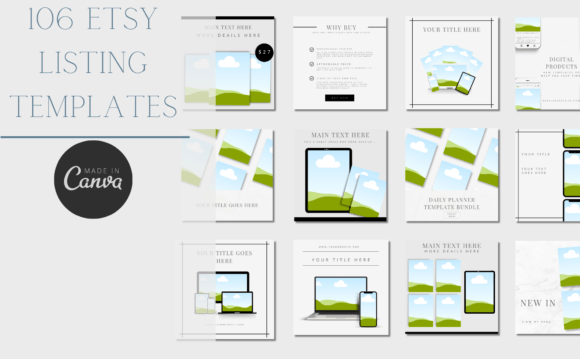
At its core, this is a large-scale collection of editable templates designed specifically for Etsy sellers. Hosted on Canva, a widely accessible graphic design platform, the templates are pre-formatted to Etsy's recommended image dimensions. The primary function is to provide a structured layout where sellers can drag and drop their product photos into designated frames. This eliminates the need to build listing graphics from a blank canvas.
The collection's distinct character comes from its design aesthetic and scale. The pink and grey colour palette is chosen to be eye-catching and modern, aiming to make listings pop in a crowded search results page. With 106 templates, the sheer volume is a key feature. This isn't just a set of 5 or 10 layouts; it's a comprehensive library intended to cover a wide range of listing types, from a standard main image to detailed graphics highlighting features, size charts, and bonus materials. This makes it particularly useful for coaches, and sellers of planners, printables, eBooks and any digital or printable products, as these niches often require multiple image types to convey value and usage.
Comparing the Approach: Templates vs. Other Design Paths
When evaluating the 106 Etsy Listing Templates, it's helpful to position them within the broader landscape of design options available to sellers. The main alternatives typically fall into three categories:
- Custom Graphic Design: Hiring a freelance designer or agency for bespoke listing graphics. This offers total creative control and a unique brand identity but comes with a significantly higher cost and longer timeline.
- Individual Template Purchases: Buying smaller, themed packs of templates from various creators. This allows for more curated style choices but can be less cost-effective if you need a high volume of diverse layouts.
- DIY from Scratch: Using Canva, Adobe Express, or similar tools to build every image manually. This is the most affordable option financially but demands the most time and a working knowledge of design principles like alignment, hierarchy, and color theory.
The 106-template pack occupies a specific middle ground. It offers the efficiency of a pre-made system with a volume that supports scaling, at a one-time cost that is lower than custom work. Its tradeoff is a lack of uniqueness; other sellers can purchase the same templates, which is a critical consideration for brand differentiation.
Strengths and Practical Benefits for Your Workflow
The most immediate strength of this resource is time efficiency. The structured frames remove the guesswork of layout and composition. For a seller launching a new collection of printable wall art, for example, instead of designing 10 unique listing images, they can select a template for each image type, insert their artwork, tweak the text, and be done in a fraction of the time.
The Canva-based format is another significant advantage. Canva's free account is sufficient for basic use, making the tool accessible to virtually anyone. The learning curve is gentle compared to professional software, and the platform's collaboration features can be useful for teams. The ability to change the colours, add icons, rearrange elements and add text provides a layer of customization that allows sellers to adapt the pink and grey base design to better match their existing branding. You could, for instance, change the accent colour from pink to a brand-specific teal and swap out generic icons for ones that reflect your product's niche.
The large number of templates also facilitates visual consistency. Using a coordinated set of layouts across all your listings creates a professional, cohesive shop aesthetic. This builds trust with potential buyers and can contribute to a stronger brand identity over time, even when starting with a shared design foundation.
Important Tradeoffs and Limitations to Consider
No tool is without its constraints, and being aware of them is key to making an informed decision. The most obvious limitation is the potential for a non-unique shop look. If multiple sellers in the same niche use the same popular template pack without sufficient customization, their shops could start to look similar. Overcoming this requires a commitment to the customization tools within Canva—changing colors, fonts, and element placements—to make the templates your own.
A technical note mentioned in the product description is also important: "Some templates contain premium elements, please ensure that you check shadow drop under edit photo when adding any photos to the templates." This means certain design features within Canva may require a Canva Pro subscription to use without a watermark. While the templates themselves are accessible with a free account, unlocking their full visual potential might incur an additional, ongoing software cost. Sellers should factor this into their budget and decision.
Finally, while the templates are versatile, they are not a magic solution for poor product photography. The templates are designed to frame and present your photos; they cannot fix issues with lighting, focus, or composition in the original image. A great template will enhance a good photo, but it cannot rescue a bad one. The foundation of a strong listing is still high-quality product imagery.
Is This the Right Choice for You? Decision Factors
The 106 Etsy Listing Templates are likely a strong fit if you identify with the following scenarios:
- You are a new seller or small business looking to establish a professional presence quickly without a large initial design investment.
- You sell digital products like printables, planners, or eBooks, where the listing images are the primary way customers evaluate the product's quality and design.
- Your primary design goal is speed and consistency over absolute uniqueness.
- You are comfortable using Canva's basic editing tools and are willing to spend time customizing the templates to differentiate your shop.
You may need to explore other options if:
- Brand uniqueness is your absolute top priority, and you have the budget for custom design work.
- Your products are highly specialized or physical, requiring very specific photographic treatments that don't fit well into standardized frames.
- You are unwilling to use Canva or pay for any potential premium element access.
Ultimately, evaluating this resource comes down to a practical assessment of your time, budget, design skills, and brand strategy. For many sellers, especially those in the digital product space, the tradeoff of starting with a shared template in exchange for a massive reduction in design time and cost is a worthwhile one. It provides a structured, professional-looking starting point that can be customized to grow with your business, allowing you to focus more of your energy on creating the products themselves.